

Database Backups
Bablo Admin can save a full copy of your server database (every table, not only its own) as a compressed .sql.gz file. Backups run automatically on a schedule, and staff can start one at any time from the panel.
Who can use it
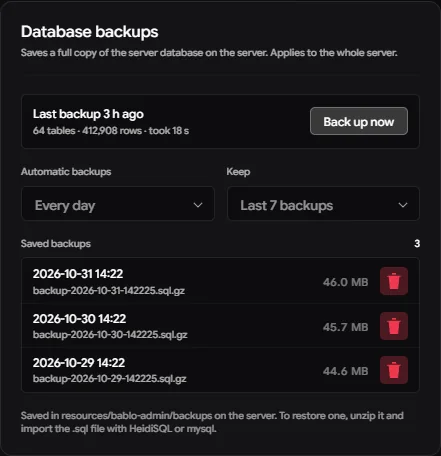
The Database backups card in Settings needs the Manage Staff permission (roles.manage). From there staff can:
- start a backup with Back up now,
- change how often automatic backups run and how many are kept,
- see the last backup (when, how many tables and rows, how long it took, or why it failed),
- see and delete saved backups.
Every start, delete and schedule change is written to the action log (Logs page).
Where the files go
Backups are saved on the game server, in a backups folder inside the bablo-admin resource folder (created on the first backup). For example:
resources/bablo-admin/backups/backup-2026-10-31-031500.sql.gzThe name is the date and time the backup started (backup-YYYY-MM-DD-HHMMSS.sql.gz). While a backup is running it is written to a .part file, which is renamed when it is complete, so a half-finished backup never looks like a real one.
The backups live on the same machine as your database. Copy important ones somewhere else too (another disk, cloud storage) so a broken server doesn’t take them with it.
Schedule and keep count
Config.Backups = {
    Enabled = true,
    EveryHours = 168,
    Keep = 7,
}| Setting | Choices | Description |
|---|---|---|
| Automatic backups | Off, 6, 12, 24 or 48 hours, every week (default) or every month | A backup runs when the newest saved one is older than this. The server checks once a minute, so on a fresh install the first one runs about a minute after start. |
| Keep | 3, 5, 7, 14 or 30 | After each backup, the oldest files beyond this number are deleted. Backups started by hand count too. |
The values in config.lua are only the starting values. Once staff change them in Settings, the panel values are saved in the database and used from then on. Set Enabled = false to turn the whole feature off: no automatic backups, and Back up now is unavailable.
What a backup contains
- Every table of the database oxmysql is connected to, with its structure (
DROP TABLE IF EXISTS+CREATE TABLE) and all its rows. - Generated columns are left out, since the database recreates them.
- Views, triggers and stored procedures are not included.
The backup reads the tables in batches in the background while the server keeps running. Only one backup runs at a time.
Restoring a backup
- Stop the server (or at least every resource that writes to the database), so nothing writes while you import.
- Copy the
.sql.gzfile from thebackupsfolder and unzip it (7-Zip, WinRAR, orgunzipon Linux). You get a.sqlfile. - Import the
.sqlfile into your database.
Connect to your database server, select your server’s database on the left, then use File → Run SQL file… and pick the .sql file.
Importing replaces every table in the file with the backed-up version, so anything saved after the backup is lost.