

Languages
Every text in Bablo Admin comes from the JSON files in the locales folder. English (en.json) and Swedish (sv.json) ship with the resource.
There are two language settings:
- the server language in
config.lua, used for players and for everything the server writes for everyone, - a personal language each staff member can pick for themselves.
Server language
Config.Locale = "en"Loads locales/<locale>.json. This is what players who are not staff see (the report window, polls, warnings, jail and community service messages), and what staff see until they pick their own language.
Text the server writes for everyone also uses the server language, for example the ban, kick and whitelist screens on the connect screen and the posts in the Discord log channel.
A region part is ignored, so "en-US" loads en.json. If the file is missing, English is used.
Personal language for staff
Each staff member picks their own language in Settings → Profile → Language. It changes the admin menu, the quick menu and their own messages in game, and only for them. Server language follows Config.Locale.
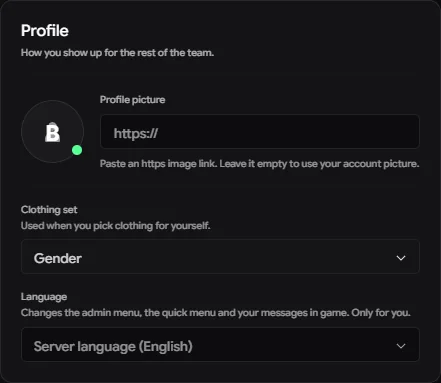
The choice is saved with the staff member, so it applies in game and on the web panel, which reads the same locales files from your server.
The Discord bot always answers in English.
Adding a language
-
Copy
locales/en.jsontolocales/<code>.json, for examplelocales/de.json. The code may use letters, digits,-and_(up to 16 characters). -
Translate the values, never the keys:
JSON"admin.access.denied": "Du hast keinen Zugriff auf das Admin-Panel.", -
Set the name shown in the picker:
JSON"language.name": "Deutsch", -
Restart the resource (
restart bablo-admin).
The new language then shows up in every staff member’s language picker and on the web panel. To make it the server language, set Config.Locale = "de".
Tips
- Keep every
%sin a value. It is replaced with a name, number or time, in the same order as in English. - Keep the file flat (
"key": "value"pairs, likeen.json) and valid JSON. A file that is not valid JSON is left out, and the console printslocales/<code>.json is not valid JSON. - You don’t have to translate everything at once. Keys missing from your file show in English in the admin menu.
- After an update, compare your file with the new
en.jsonand translate any new keys.