

Staff & Ranks
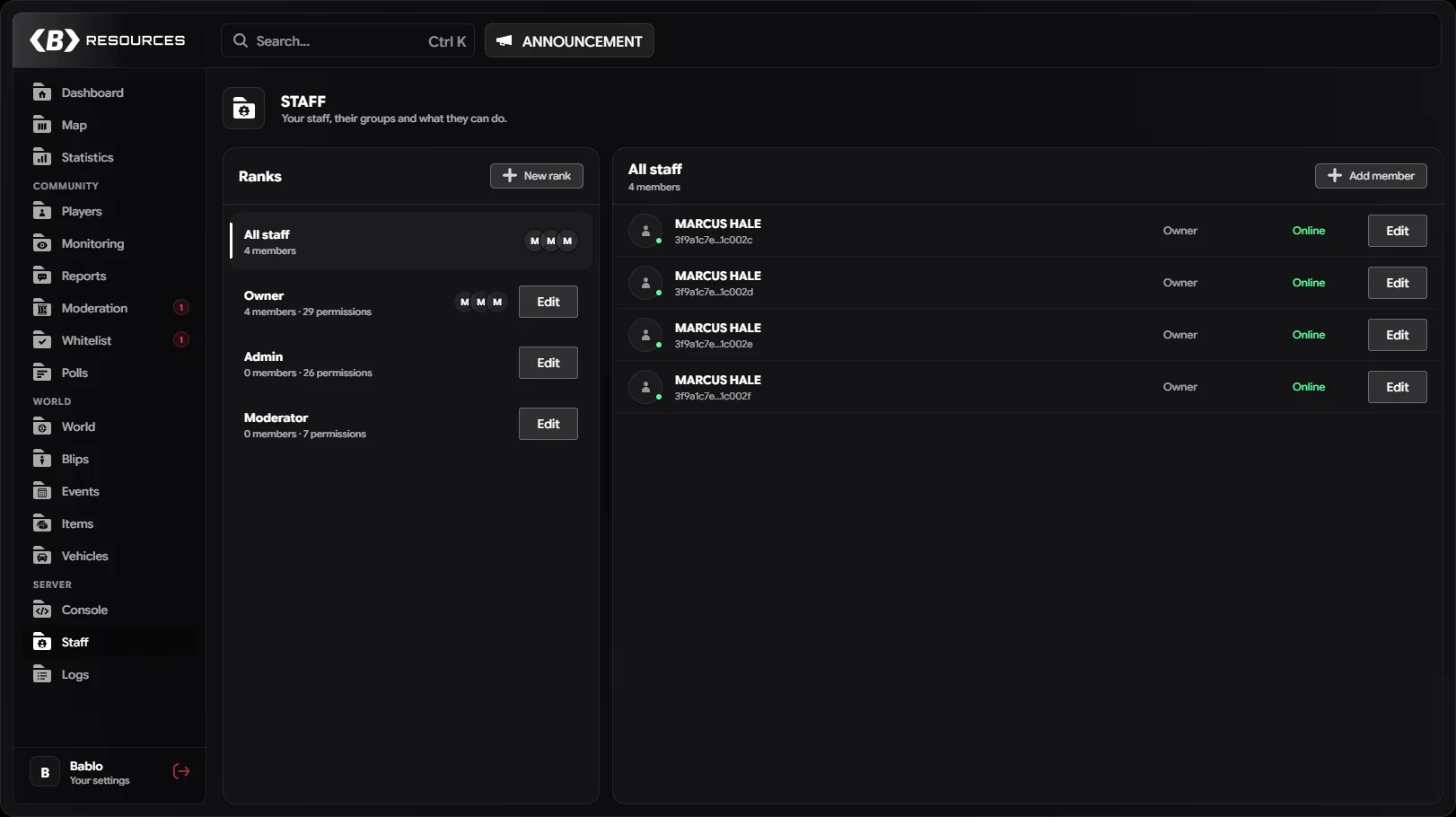
Staff access is stored in the database, not in config files. Every staff member belongs to one rank (called a tier in the console command), and the rank decides what they can do. Everything is checked server-side: the panel only hides what a staff member can’t use.
Manage both on the Staff page of the panel. You need the Manage Staff permission (roles.manage) to open it.
Default ranks
On first start the resource creates four ranks. You can edit, rename or delete them like any other rank.
| Rank | Hierarchy | Permissions |
|---|---|---|
| Owner | 100 | Full access (*) |
| Admin | 75 | Every permission except Manage Staff, Server Console and Resources |
| Moderator | 50 | Kick & Warn, Jail Players, Revive & Heal, Teleport, Spectate, Live Monitoring, Temporary Bans, Announcements, Quick Menu |
| Support | 25 | Revive & Heal, Teleport, Spectate, Quick Menu |
Ranks
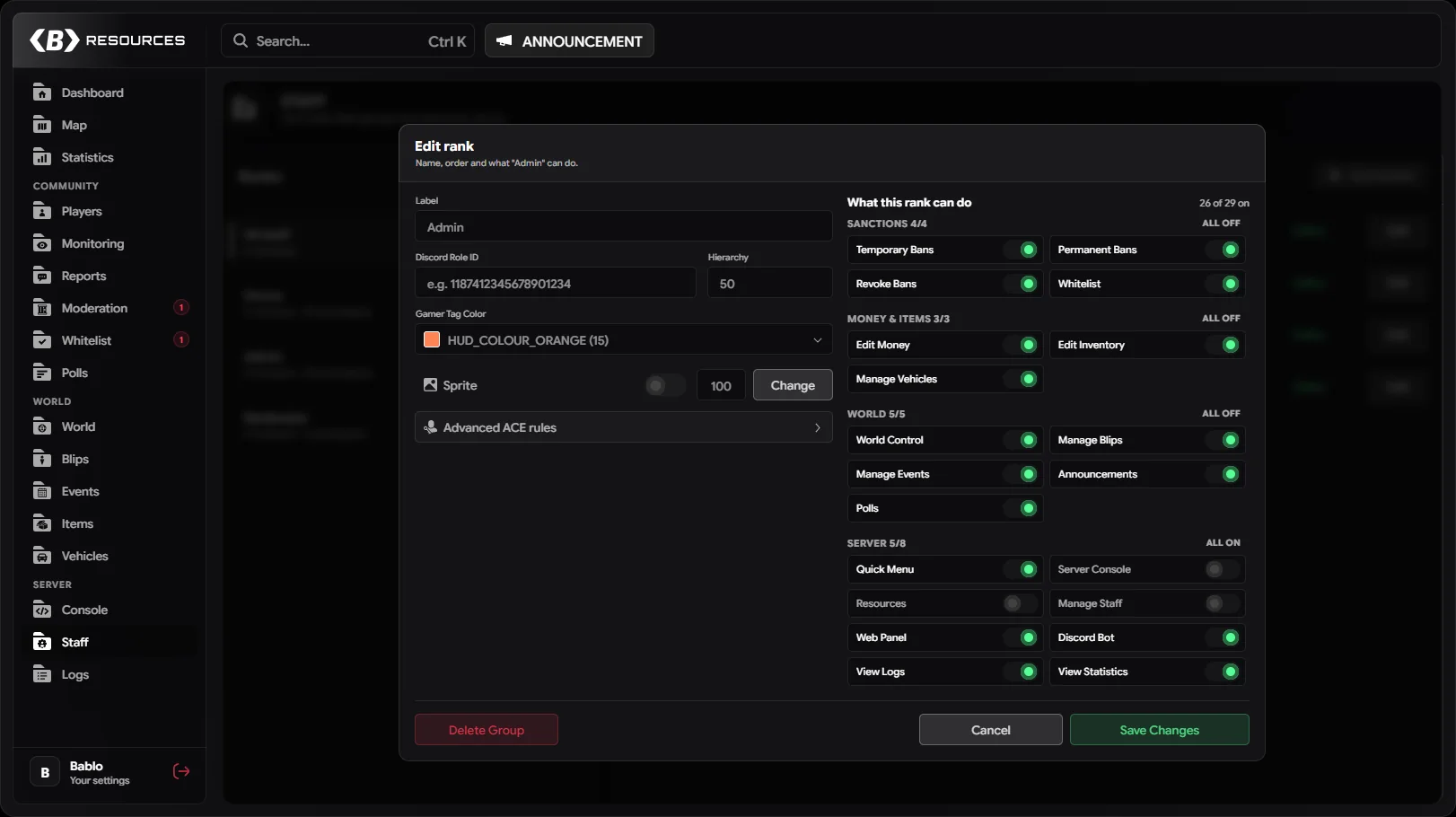
| Field | Description |
|---|---|
| Label | The rank name. Must be unique. |
| Discord Role ID | Optional. Links the rank to a Discord role for the Discord role sync (17–20 digits). |
| Hierarchy | A whole number from 0 to 100. Higher outranks lower. |
| Gamer Tag / colour | Whether members of this rank can show a staff tag above their head, and its colour. See Staff tags. |
| Sprite | A picture for the rank (PNG, WebP, JPG or GIF, up to 256 KB) and its size (10–300). Under Show it, pick Above head (floats above the staff tag of members who have their tag on, seen by players nearby) and/or On the map (replaces their dot on the Live Map in the admin menu and the web panel). |
| Permissions | What the rank can do, grouped as Players, Sanctions, Money & items, World and Server. |
| Advanced ACE rules | ACEs and commands given to members while they are online. See ACE mirroring. |
A rank can only be deleted when nobody is in it.
Discord role sync
When a rank has a Discord Role ID and the role sync is set up in Settings → Discord (it needs the bablo_admin_discord_token convar, see Installation), players with that Discord role get the rank when they join, and lose it when the role is gone. Changing a synced member’s rank by hand stops syncing that member. See Discord role sync.
Staff members
A staff member is a display name, a rank and one or more identifiers: license2, discord, steam, fivem. A license2 or a discord identifier is required. When you add a member you can type a name or pick an online player, which fills the identifiers for you.
When a staff member joins, any identifiers missing from their record (Discord, Steam, FiveM) are filled in automatically. A member is matched in this order: license2, fivem, discord, steam.
An identifier can only belong to one staff member.
Hierarchy rules
Permissions alone aren’t enough, rank matters too:
- You can only edit or delete ranks below your own hierarchy, and only edit, move or remove members whose rank is below yours. Staff with full access (
*) can also act on their own level. - You can only move members into ranks below your own, and you can’t give a rank a hierarchy above your own.
- You can only turn on or off permissions you have yourself. Only full-access staff can give or take full access, or change a rank’s ACE rules.
- You can’t change your own rank or remove yourself.
- The last member of a full-access rank can’t be removed or moved out of it.
- Kicks, bans, jails, troll actions, inventory and vehicle actions and screenshots on another staff member need a higher hierarchy than theirs.
Permission keys
| Key | Label | Grants |
|---|---|---|
player.kick | Kick & Warn | Kick and warn players, delete warnings, mute, flag players, clear notes; bulk kick/warn in Monitoring |
player.jail | Jail Players | Jail, community service, release from both, freeze, handcuff, strip weapons |
player.heal | Revive & Heal | Revive, heal, armour, food & water, reload skin; heal and revive yourself from the quick menu |
player.teleport | Teleport | Teleport to and bring players, change a player’s routing bucket, quick menu teleports |
player.troll | Troll Actions | The troll menu (kill, slap, explode, ragdoll, burn and more), taking control of a player, vehicle trolls |
character.edit | Edit Characters | Job and gang, identity, ped model, clothing menu, deleting a character |
ban.temporary | Temporary Bans | Ban with a duration, edit bans, add and remove ban evidence |
ban.permanent | Permanent Bans | Permanent bans and blacklists (needs Temporary Bans too, to open the ban window) |
ban.revoke | Revoke Bans | Unban, answer ban appeals |
player.spectate | Spectate | Spectate a player in person, take a screenshot of a player’s screen |
monitoring.view | Live Monitoring | The Monitoring page, remote spectate feeds and listening in, bulk message |
player.view_ip | View IPs | See players’ IP addresses in the player view |
money.edit | Edit Money | Give and set money |
inventory.edit | Edit Inventory | Give, remove and clear items, edit item metadata, wipe an item from everyone |
vehicle.manage | Manage Vehicles | Spawn, give, delete, repair, keys, plates, owners, garage, impound, mods, notes and the vehicle wipe |
world.control | World Control | Weather, time, freeze time, blackout, density, clear area, world effects, zones |
blips.manage | Manage Blips | Map markers |
events.manage | Manage Events | Create and delete server events |
announce.send | Announcements | Send announcements to every player |
tools.quickmenu | Quick Menu | The quick menu and its tools (noclip, god mode, entity inspector and the rest) |
console.exec | Server Console | The Console page: read the server console and run commands |
resources.control | Resources | Start and stop resources, restart or stop the server |
roles.manage | Manage Staff | The Staff page, the staff tag format, the action log retention, Discord settings and database backups |
web.access | Web Panel | Sign in to the web panel |
discord.access | Discord Bot | Use the Discord bot |
logs.view | View Logs | The Logs page |
stats.view | View Statistics | The Statistics page and the rich list |
whitelist.manage | Whitelist | The Whitelist page and access requests |
polls.manage | Polls | Start, end and delete polls |
Quick menu tools that change something for others still need their own permission. For example spawning a vehicle needs Manage Vehicles and Blackout needs World Control.
Some things need no permission: opening the panel, the dashboard, browsing players, vehicles and items, staff notes on players, messaging a player and answering reports.
Full access
A rank with * has every permission, including ones added in future updates. The default Owner rank has it.
Web Panel and Discord Bot
These two decide where a staff member can use the panel outside the game:
- Web Panel (
web.access) lets the member sign in to the web panel with Discord. See Give your staff web access. - Discord Bot (
discord.access) lets the member use the Discord bot.
Both need a Discord identifier on the member’s record, since that is how they are recognised. What they can do there still follows their rank’s other permissions. Owners from Config.Owners with a discord: identifier always get both.
Creating the first owner
On a fresh install nobody is staff. The console says so on every start and lists the ways in. Any one of these makes you an owner:
Join the server as a server admin and run /admin. While nobody is staff yet, the first server admin who does this is added to the top rank.
A server admin is anyone with the command ACE (txAdmin admins have it), a QBCore god or admin, an ESX admin or superadmin, or a Qbox admin. Needs Config.FirstAdminSetup = true (the default).
A player needs a license2 identifier to be added from the game or the console.
Owners from Config.Owners or Config.OwnerAce always have full access, whatever rank they are in, and are added to the top rank again when they join after being removed. To take an owner’s access away, remove them from Config.Owners (or remove the ACE) first.
ACE mirroring
Each rank can give its online members ACEs and commands, so other resources that check ACEs (for example /car or /tpm) follow your staff ranks. Fill them in under Advanced ACE rules in the rank editor:
| Field | Example | Added as |
|---|---|---|
| Allow ACEs | okoktuning.admin | add_ace bablo-admin.tier.<rank id> okoktuning.admin allow |
| Deny ACEs | vipshop.admin | add_ace bablo-admin.tier.<rank id> vipshop.admin deny |
| Allowed Commands | car, dv, tpm | add_ace bablo-admin.tier.<rank id> command.car allow |
* in Allowed Commands allows every command. Online members are added to their rank’s principal (add_principal player.<id> bablo-admin.tier.<rank id>) and removed when they leave, change rank or the resource stops.
For this to work the resource must be allowed to change ACEs. Add these lines to server.cfg:
add_ace resource.bablo-admin command.add_ace allow
add_ace resource.bablo-admin command.remove_ace allow
add_ace resource.bablo-admin command.add_principal allow
add_ace resource.bablo-admin command.remove_principal allow
Without them, the console prints these lines once when a rank has ACE rules, and nothing is applied.
Only staff with full access can change a rank’s ACE rules.
Staff tags
A staff tag is a name tag above a staff member’s head that every player within Config.QuickMenu.StaffTagRange (30 m by default) can see.
- The rank decides whether its members can show one (Gamer Tag) and in which colour.
- Each staff member turns their tag on for the session from the quick menu, or always from Settings → Name tags → Show my staff tag.
- The tag text is the same for every staff member and is set in Settings → Name tags → Staff tag by staff with Manage Staff. The default is
{group} [{svid}] {name}.
| Token | Replaced with |
|---|---|
{group} | Rank label |
{svid} | Server ID |
{name} | FiveM name |
{char_name} | Character name |
{charId} | Character ID (citizen ID) |
Empty [] brackets are removed when a token has no value.